Support
Something not working? Start here.
Most messages we get are about one station that will not play, or a Pro purchase that needs restoring. Both are below, along with a real email address that a person reads.
When a station will not play
This is the single most common thing people write in about, and it is usually not a fault in the player. Internet radio stations go off air, change their stream address, or fill every listener slot they have paid for. The public directory keeps the entry long after the stream stops answering.
The player says so plainly rather than showing an error code. The status line under the station name becomes a sentence about the station, in amber, and tapping either it or the play key retries the same stream.
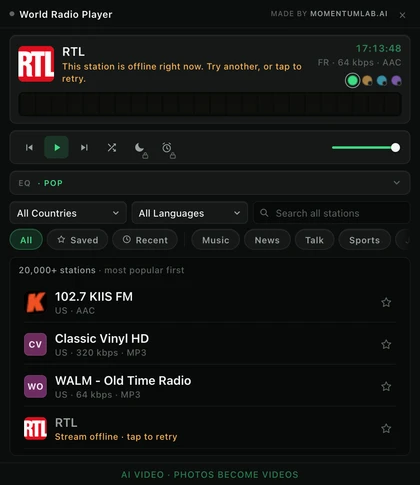
If the next station you try plays normally, the first entry is simply stale and there is nothing to fix on your machine. If nothing plays at all, that is a real problem and worth an email.
Restoring a Pro purchase
World Radio Pro is tied to the email address you bought it with, and not to a password, because there is no account to hold one. To bring it back on a new machine or after a reinstall:
- Open the extension and go to the Pro panel.
- Choose to restore your purchase.
- Enter the email address you bought with. ExtensionPay sends a sign in link to it.
- Click the link in that email. The licence returns to the extension.
Keep a note of the email address you paid with. It is the only thing that identifies your purchase, and if it is a work address you later lose access to, recovering the licence gets much harder.
Contact us
Email [email protected] and put World Radio in the subject line. That reaches the people who make it. There is no phone number and no live chat, and we would rather say that than list one nobody answers.
Worth including if you have it: which browser and version, the name of the station that misbehaved, what you were doing when it went wrong, and a screenshot. For anything about a payment, the email address you bought with and roughly when is usually enough.
We answer within one business day in most cases. We are in the Australian eastern time zone, so a message sent in the European or American evening is normally answered while you are asleep.
Correcting the directory itself
Station names, countries, languages, logos and stream addresses come from radio-browser.info, an open community database. If a station is filed under the wrong country or its logo is broken, correcting it there fixes it for every application that uses the directory rather than only for ours. Tell us as well and we will pass it along.
If you run a station and it has a page of its own on this site, you can ask us to correct anything on that page or to remove it altogether. Email [email protected] from an address at the station, or from the contact address published on the station's own site, and say which page. We do not require a reason and we do not argue the point.
Common questions
- A station will not play. Is the extension broken?
- Almost always no. Internet radio stations go off air, move their stream or run out of listener slots, and that happens to a few of them every day. The player tells you plainly when a stream is offline and offers a retry. Try the retry once, then try another station: if the next one plays, the directory entry for the first is simply stale. If nothing at all plays, that is worth writing to us about.
- I hear no sound from any station.
- Check the volume fader in the player itself, then the volume of the Chrome tab, then the system output device. If the tab shows a muted speaker icon, Chrome has muted the site. If none of that is it, try disabling and re-enabling the extension from chrome://extensions, which restarts its audio engine. Then write to us with what you tried.
- The equalizer says it is waiting, and the spectrum wall is not reading the audio.
- That station serves its stream without the cross origin header a browser needs before it will let anything read the audio, so no web player can analyse it. Roughly half of internet radio is in this position. Your preset stays set and applies the moment you land on a station that allows it. Playback itself is never affected.
- I bought Pro and it is gone after reinstalling or on a new machine.
- Open the extension, go to the Pro panel, and choose to restore your purchase. ExtensionPay will email a sign in link to the address you bought with; click it and the licence comes back. There is no password to remember because there is no account, which is also why the email address you paid with is the one thing worth keeping a note of.
- I do not know which email address I used to buy Pro.
- Look for a receipt from ExtensionPay or from Stripe in your mail, including the spam folder. If you cannot find one, write to us from any address you might have used, say roughly when you bought it, and we will help you find the purchase.
- A station is listed in the wrong country, or its logo is wrong.
- The directory comes from radio-browser.info, an open community database that anyone can correct. Fixing it there fixes it for every app that uses it, including this one, rather than only for our copy. Tell us as well if you like and we will pass it on.
- Why are there fewer stations for my country here than on other sites?
- We only count streams a browser can actually play. Around half of the entries in the public directory are http only, and a browser blocks those inside a secure page as mixed content, so listing them would mean listing stations that cannot be heard. A count that includes them is a bigger number and a worse answer.
- Does it work in Edge, Brave or Opera?
- It is built for Chrome and installed from the Chrome Web Store. The Chromium based browsers that can install from that store generally run it fine, but Chrome is the one it is tested against and the only one we can promise.
- How do I remove it, and does that remove my data?
- Right click the extension icon and choose to remove it, or use chrome://extensions. Uninstalling deletes everything it stored on your machine: favorites, settings, recently played and the cached licence. There is no server side account to close because there is no account.
Still stuck? Write to us.
A real person reads [email protected] and answers it, usually within a business day.